

This renderer automatically creates links for you.
- URLs can be made clickable automatically.
- Specific and frequently used terms can be configured to be automatically linked to a definition URL.
Plugins Settings

Autolink URLs
Check this to have URLs automatically made clickable. The plugin will detect URLs starting with http: https: mailto: aim: and icq:
The plugin will also detect web addresses staring with www, as well as email addresses containing an @.
This will save you time when mentioning URLs you want to link to.
Autolink definitions
Select the definition files you want to use. It is recommended that you add your own definitions to definitions.local.txt in order to make sure your custom definitions never get overwritten in an upgrade process.
See the file definitions.default.txt in the /plugins/autolinks_plugin/ folder for details about the file format. You can create definitions for one specific word or for groups of two words. (In case you wonder, the file format takes a word approach in order to optimize for rendering performance with large files and large posts.)
This will save you time with the URLs you frequently link to for reference. Although we’re not necessarily recommending the use of Wikipedia, this is where many pro bloggers would want to enter their industry specific terms and their Wikipedia links.
Custom definitions
You can add custom auto link definitions by typing in the definitions using the following format (1 definition per line):
word1;word2;;destinationHere’s an example:
b2evolution;;;b2evolution.net/This will find the first occurrence of the word b2evolution in every new post and link it to http://b2evolution.net/
A more complex example:
engine;multiblog;;b2evolution.net/This will find the first occurrence of the words multiblog engine in every new post and link it to http://b2evolution.net/
Note: if there is already a link to http://b2evolution.net/ in the post, the autolinks plugins will not create a second one.
In the same vein, if you type the b2evolution multiblog engine, only b2evolution will get a link because multiblog engine would be a redundant link.
Per Collection Settings
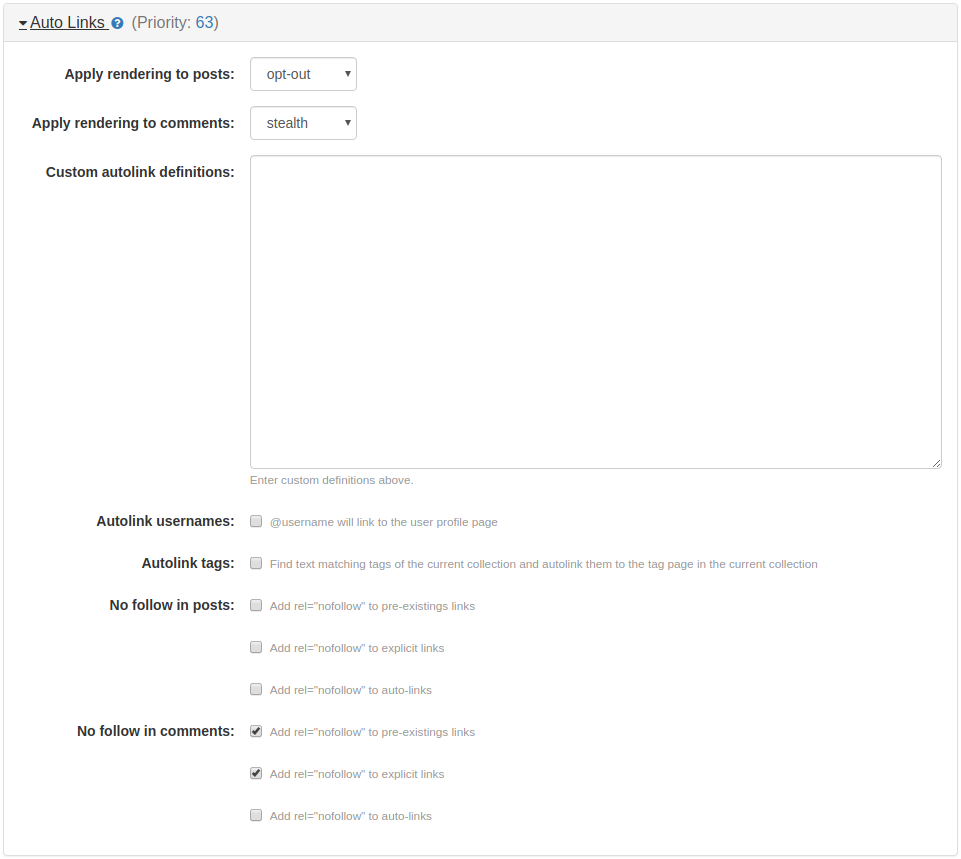
This section contains four options: Apply rendering to posts, Apply rendering to comments, Custom autolink definitions, and No follow, where you can specify how you want links on your posts and comments to be rendered. You can either make links or URLs to be automatically clickable or you can configure and specify frequently used terms to be automatically linked to a definition URL.
The rendering options (both posts and comments) contains the same plugin rendering settings that you can use in the b2evolution system:
- stealth (default setting for applying rendering to comments)
- always
- opt-out (default setting for applying rendering to posts)
- opt-in
- automatic
- never
For more information about the rendering options, read about it at the Plugin/Apply Rendering page.
Custom autolink definitions
This option allows you to specify additional custom auto link definitions on a per collection basis. This works similarly to the Custom definitions field above.
Autolink usernames
This option will automatically create links to a user’s profile for the first occurrence of a user’s login, i.e., @ + login.
Autolink tags
This option will match tags of the current collection and automatically create links to the tag page of the current collection.
No follow
Surely you know what the nofollow value does to a link’s rel attribute, it reduces the capacity of certain search engine spams, which of course improves the quality of search engine results and prevents spams. This value was created fundamentally on the advent of comment spamming so you may want to use this option as well to prevent spamming headaches.
You have three choices under this option, you can either add rel="nofollow" to pre-existings links, or add rel="nofollow" to explicit links, or add rel="nofollow" to auto-links, or you can check all three choices if you need to (all choices are unchecked by default). Be careful of your choices though, numerous folks may not like the presence of nofollow on links, so be mindful of the trade-offs.