Powered by MediaWiki
Personal tools

Skins 2.0

From B2evolution

Jump to: navigation, search

In b2evolution 2.0 and above, skins follow a new organization which is different from pre 2.0 skins)

Contents

[edit] Main templates

At the very least, the skin folder /skins/myskin2 must contain a main template file named index.main.php .

Depending on what b2evo wants to display, it will call a specific "top level" a.k.a. "main" template (*.main.php) within the skin folder. If the sought template is not found, b2evo will fall back to the default index.main.php.
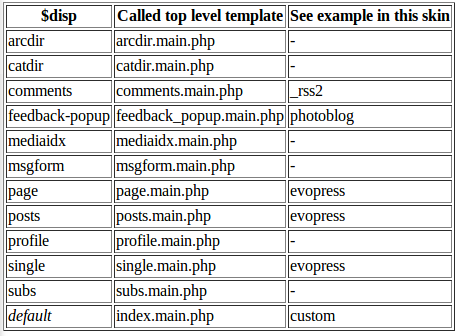
$dispCalled top level templateSee example in this skin
'arcdir'arcdir.main.php-
'catdir'catdir.main.php-
'comments'comments.main.php_rss2
'feedback-popup'feedback_popup.main.phpphotoblog
'mediaidx'mediaidx.main.php-
'msgform'msgform.main.php-
'page'page.main.phpevopress
'posts'posts.main.phpevopress
'profile'profile.main.php-
'single'single.main.phpevopress
'subs'subs.main.php-
defaultindex.main.phpcustom

[edit] Disp templates

--Esanchez 04:25, 31 January 2008 (CET)It would be so much better if we could build this example out with real php code:

<?php
  	// -------------- MAIN CONTENT TEMPLATE INCLUDED HERE (Based on $disp) --------------
  	skin_include( '$disp$', array(
  			'disp_posts'  => '',		// We already handled this case above
  			'disp_single' => '',		// We already handled this case above
  			'disp_page'   => '',		// We already handled this case above
  		) );
  	// Note: you can customize any of the sub templates included here by
  	// copying the matching php file into your skin directory.
  	// ------------------------- END OF MAIN CONTENT TEMPLATE ---------------------------
  ?>

What are the other ' TEXT ' that could be used inside the array? is the list below accurate? It doesn't seem to be.

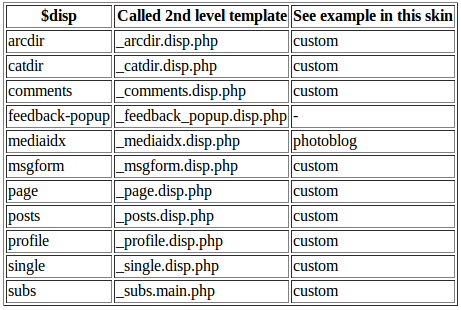
If no main template has been found for a specific display, the default index.main.php will be called. That template will generally include a call to skin_include( '$disp$', ... ) which will in turn include a "second level" a.k.a. "disp" template.

$dispCalled 2nd level templateSee example in this skin
'arcdir'_arcdir.disp.phpcustom
'catdir'_arcdir.disp.phpcustom
'comments'_comments.disp.phpcustom
'feedback-popup'_feedback_popup.disp.php-
'mediaidx'_mediaidx.disp.phpphotoblog
'msgform'_msgform.disp.phpcustom
'page'_page.disp.phpcustom
'posts'_posts.disp.phpcustom
'profile'_profile.disp.phpcustom
'single'_single.disp.phpcustom
'subs'_subs.main.phpcustom

If a specific disp template is not found within the skin directory (for example /skins/myskin2/_msgform.disp.php is not found), then the default disp template from the /skins directory will be used (here /skins/_msgform.disp.php would be used).

[edit] Include files

The main and disp templates above may in turn call include files (*.inc.php).

For example, many skins will use a common header and footer for all their templates. These will be in include files named like this:

  • _html_header.inc.php (contains INvisible common headers, typically the <HEAD> section of the HTML pages)
  • _body_header.inc.php (contains VISIBLE common headers, typically the top blog banner)
  • _body_footer.inc.php (contains VISIBLE common footers, typically the bottom credits)
  • _html_footer.inc.php (contains INvisible common footers, typically logging and debugging code)

If a specific include file is not found within the skin directory (for example /skins/myskin2/_html_header.inc.php is not found), then the default include from the /skins directory will be used (here /skins/_html_header.inc.php) would be used.

[edit] Template tags

Template tags follow a new structure we believe to be future proof.

Template Tag details here »

[edit] Styling widgets

Dunno how many people know this already, but b2evolution v220 has a method to automagically apply styles to each widget you might select for any given container. Your skin needs to use a special class caller in order to get the automagic classes to happen. After that, your style sheet needs to say what these styles will do. Playing around with this stuff a little bit will let you, for example, increase the font size of your blog list and change your linkblog text color. Or whatever you want to do with any given widget.

So let's start by making sure you use the special class caller thing. It's really easy, and it starts by having a little understanding of "containers". When I look at index.main.php in the 'custom' skin I see this at line 40:

 skin_container( NT_('Page Top'), array(

THAT is calling a container. Now dig on line 42:

 'block_start' => '<div class="$wi_class$">',

THAT is calling the special class caller. $wi_class$ will turn into something unique for each and every widget. The details of exactly what each widget gets will follow, but first I want to jump down to line 324 in the same file. It says:

 'block_start' => '<div class="bSideItem $wi_class$">',

This happens to be the "block start" value for the sidebar container, and will give us "bSideItem" AND the special widget class for each widget in the sidebar. NOW I can have a bloglist in the header AND in the sidebar with different styling applied. Cool trick?

Okay so here is what $wi_class$ becomes for EVERY widget you can currently install:


  • widget_core_colls_list_public == styling the "Public blog list" widget.
  • widget_core_colls_list_owner == styling the "Same owner's blog list" widget.
  • widget_core_coll_logo == styling the "Blog logo" widget.
  • widget_core_coll_title == styling the "Blog title" widget.
  • widget_core_coll_tagline == styling the "Blog tagline" widget.
  • widget_core_coll_page_list == styling the "Page list" widget.
  • widget_core_coll_post_list == styling the "Post list" widget.
  • widget_core_coll_category_list == styling the "Category list" widget.
  • widget_core_coll_longdesc == styling the "Long Description of this Blog" widget.
  • widget_core_free_html == styling the "Free HTML" widget.
  • widget_core_coll_common_links == styling the "Common Navigation Links" widget.
  • widget_core_coll_search_form == styling the "Content Search Form" widget.
  • widget_core_coll_xml_feeds == styling the "XML Feeds (RSS / Atom)" widget.
  • widget_core_menu_link == styling the "Menu Link" widget.
  • widget_core_user_tools == styling the "User Tools" widget.
  • widget_core_linkblog == styling the "Linkblog" widget.
  • widget_plugin_evo_Calr == styling the "Calendar Widget" widget.
  • widget_plugin_evo_Arch == styling the "Archives Widget" widget.


What this means is that if you define "widget_core_colls_list_public" in your style sheet AND use the $wi_class$ gizmo in your skin's appropriate php file your style will apply to the public bloglist. No need to break it out of the container to give it some 'style love'!

Here's hoping this helps the meticulous skinner create awesome skins!