

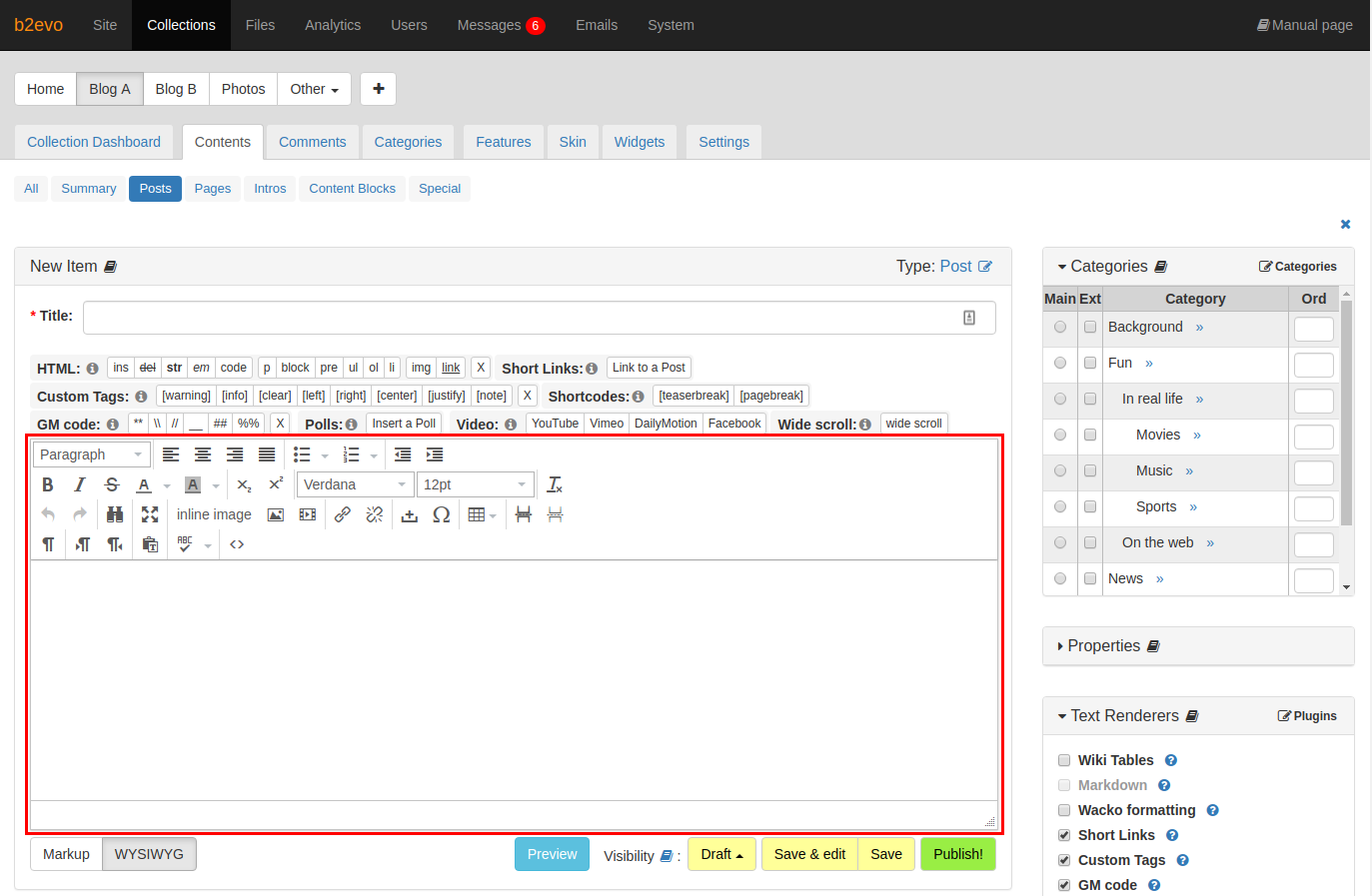
The TinyMCE Plugin allows you to integrate TinyMCE as a RTE (Rich Text Editor) - also known as WYSIWYG ("What you see is what you get") - for editing items and comments.
Plugin Settings
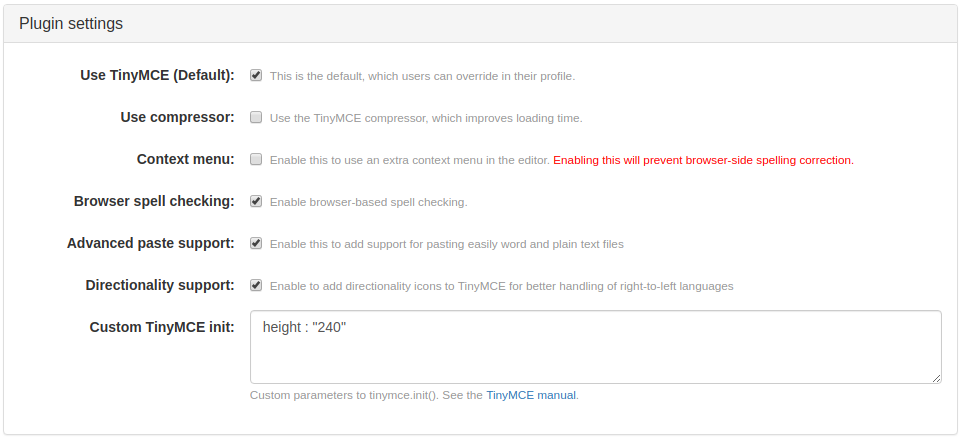
- Use TinyMCE (default): check if you would like to use TinyMCE as the default editor. Can be overridden by users in their profile’s Advanced Tab.
- Use compressor: check to enable the TinyMCE compressor that should reduce the overall download and initialization time for TinyMCE.
- Context menu: check to enable extra context menu entries for the editor. Warning: Enabling this will disable browser-based spell checking.
- Browser spell checking: check to enable browser-based spell checking.
- Advanced paste support: check to enable support for easily pasting word and plain text files. This will enable the
pasteplugin of TinyMCE. - Directionality support: check to add directionality icons and enable TinyMCE to better handle languages that is written from right to left. This will enable the
directionalityplugin of TinyMCE. - Custom TinyMCE init: add your own custom initialization configuration.
Custom Initialization Options
The following options can be enabled by adding the referenced values to the Custom TinyMCE init at System > Plugins > TinyMCE.
Manage plugins
As explained here: https://www.tiny.cloud/docs/plugins/, TinyMCE is delivered using its own plugins system. By using ,plugins : "plugin1,plugin2" you may control which plugins you want to load into your editor. The following list contains the default hard-coded plugins, so if you want to keep them, just include the whole list followed by the rest of plugins of your preference:
image, importcss, link, pagebreak, morebreak, textcolor, media, nonbreaking, charmap, fullscreen, table, searchreplace, autocomplete, lists, advlist, evo_view
The resultant list should be something like: ,plugins : "image, importcss, link, pagebreak, morebreak, textcolor, media, nonbreaking, charmap, fullscreen, table, searchreplace, autocomplete, advlist, evo_view, plugin1, plugin2"
Please note that some plugins not listed above are conditionally loaded according to other configuration parameters.
This mechanism may be improved soon.
Enabling advanced image properties tab
This action will enable a second tab inside the image properties edition window with more configuration options.
- Go to the TinyMCE settings screen (System > Plugins > TinyMCE).
- Add
,image_advtab: trueat the end of the content of the field Custom TinyMCE init
Enable browser’s native spell checker
This action will add spell checking when you use the TinyMCE editor, only for those web browsers where this feature is available.
- Go to the TinyMCE settings screen (System > Plugins > TinyMCE).
- Add
,browser_spellcheck : trueat the end of the content of the field Custom TinyMCE init
For a complete reference about the usage of TinyMCE, please go to: https://www.tinymce.com/docs/
Per Collection Settings
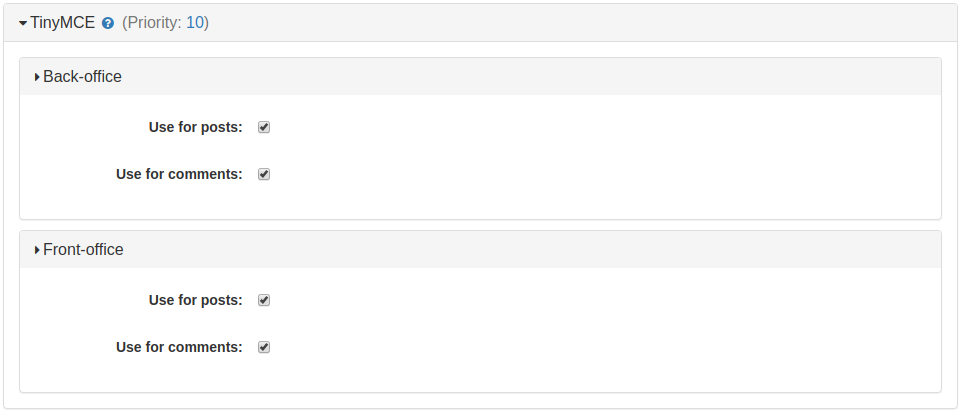
You can manage the use of TinyMCE editor on a per collection basis. You have to option to enable TinyMCE in the front-office and back-office separately for either posts or comments.
Notes for Developers
You can program some actions to be included into the TinyMCE’s functionality by using the following events:
tinymce_extend_buttons
Adds as many buttons as you want to the fourth toolbar of the editor.
Include this method in your plugin’s main class:
function tinymce_extend_buttons( &$params ) {
	array_push($params["tinymce_buttons"], "button-name");
}
tinymce_extend_plugins
Loads additional TinyMCE’s plugins. You can programatically force TinyMCE to load more plugins, in addition to its defaults and the ones defined in the Custom TinyMCE init explained above.
Include this method in your plugin’s main class:
function tinymce_extend_plugins( &$params ) {
	array_push($params["tinymce_plugins"], "plugin-name");
}
function tinymce_extend_plugins( &$params ) {
array_push($params["tinymce_plugins"], "plugin-name");
}
Location
The TinyMCE plugin’s source is hosted in the Plugins Repository at: https://evocms-plugins.svn.sourceforge.net/svnroot/evocms-plugins/tinymce_plugin/.
It can be downloaded at: Sourceforge.net and checked out using SVN:
svn checkout https://evocms-plugins.svn.sourceforge.net/svnroot/evocms-plugins/tinymce_plugin/trunk tinymce_plugin
Requirements
This plugin requires b2evolution 1.8 or later, but recommends 1.9 (for interaction with other plugins, which also work with the textarea).
Version 0.6 of the plugin adds compatibility fixes for b2evolution 2.0.
Support
- Please try the most recent version first in case of problems
- Test if disabling the "Use compressor" setting solves the problem. It should always work (and is a bug if it does not), but it helps a lot to know about this when debugging.
- If that does not solve your problem, report it in the bug tracker.
Changes
Version 0.6
- Compatibility fixes for b2evolution 2.0
- Updated TinyMCE to 2.1.2
Version 0.5
- Updated TinyMCE to 2.1.1.1
- Added "inlinepopups" plugin to list of default plugins: this uses overlays instead of window popups
- Removed extended_valid_elements default value, the default values (valid_elements) seem to be fine; better doc about relative_urls
- Removed theme_advanced_buttons1_add : "fontsizeselect", because it causes usage of FONT tag.
- Use tinyMCE.execInstanceCommand instead of the IE6 "fixed" mceInsertContent from 0.4
1 comment
Comment from: markmagill Member

This is a great text editor, easily equal to most any you’ll find online. Although you may not recognize it by name, its actually used by many different websites and website scripts and has been for many years. Simple and easy to use, its a good addition to any site.